In the world of farming and gardening, timing is everything. Knowing when your crops are ready for harvest ensures maximum yield, flavour, and quality — and minimises losses due to over-ripening or underdevelopment. That’s exactly where a Harvest Readiness Estimator comes in handy. This digital tool helps you predict the best time to harvest your crops using practical methods like Days-to-Maturity (DTM) or Growing Degree Days (GDD).
Whether you’re a small-scale home gardener, a vineyard manager, or a commercial farmer, the Harvest Readiness Estimator simplifies crop planning by translating temperature, planting date, and growth data into easy-to-read results. Let’s explore what this tool is, how it works, and how you can use it to make your next harvest perfectly timed.
Harvest Readiness Estimator
About Methods
Quick Preset Info
What Is a Harvest Readiness Estimator?
A Harvest Readiness Estimator is an online calculator designed to predict the estimated harvest date of different crops. It uses two key agricultural models:
Days-to-Maturity (DTM): This method estimates the time it takes for a crop to mature based on the number of calendar days after planting or transplanting. It’s a simple and reliable way for gardeners to know when to expect their first harvest, especially when weather patterns are consistent.
Growing Degree Days (GDD): The GDD approach is more advanced. It tracks the accumulation of heat units over time — in other words, how much warmth the crop has received. Since plant development is heavily temperature-dependent, the GDD method helps you predict maturity more accurately, even in variable climates.
Together, these methods give a clear picture of crop growth progress and expected readiness dates.
Why It’s Useful
The Harvest Readiness Estimator bridges the gap between science and simplicity. It’s particularly valuable because it:
- Improves yield and quality: You can plan harvests when crops reach optimal maturity.
- Reduces waste: Avoid premature picking or spoilage from overripe crops.
- Supports farm scheduling: Coordinate labour, storage, and sales more efficiently.
- Works across crops: From tomatoes and lettuce to wheat and grapes, it adapts to various crop types and climates.
This tool turns agricultural data into practical decisions that save both time and money.
How the Harvest Readiness Estimator Works
When you open the Harvest Readiness Estimator, you’ll find two main modes — DTM and GDD — and a list of popular crop presets such as tomatoes, cucumbers, peppers, lettuce, corn, and potatoes. Each preset comes with typical maturity ranges and growing degree day targets based on scientific data.
Here’s how each mode functions:
1. Days-to-Maturity (DTM) Method
You simply input:
- The planting or transplant date
- The expected days to maturity (either from the seed packet or preset)
The tool calculates:
- The estimated harvest window — the earliest and latest likely harvest dates
- The midpoint harvest date — the most probable time your crop will be ready
- The growth progress — how far along your crop is in its growing cycle
This is ideal for small-scale gardeners who just want a quick, reliable estimate.
2. Growing Degree Days (GDD) Method
This method is slightly more data-driven. You’ll enter:
- The base and cap temperatures (the range where growth occurs)
- The target GDD value for your crop
- Recent daily minimum and maximum temperatures
The estimator calculates how many growing degree days your crop has accumulated so far, compares it with the target, and estimates how many more days you’ll need to reach harvest.
It even adjusts dynamically if you provide more weather data, helping you track heat accumulation and predict readiness more precisely than calendar days alone.
Step-by-Step: How to Use the Tool
Using the Harvest Readiness Estimator is simple and intuitive. Here’s how:
- Select Your Units (°C or °F): Choose metric or imperial units depending on your region. Pick Your Method: Use DTM for quick estimates. Use GDD if you want a more temperature-sensitive prediction.
- Choose a Crop Preset: Select from crops like tomatoes, corn, lettuce, potatoes, or grapes. Each preset loads default parameters such as DTM range and GDD target.
- Enter Your Planting Date: Input when you planted or transplanted the crop. This forms the starting point for calculations.
- (Optional) Add Notes: Record any field-specific details like irrigation, shade, or cultivar.
- Input Growth Data: For DTM: Enter the days-to-maturity. For GDD: Enter base and cap temps, GDD target, and optionally paste daily temperature data.
- Click “Estimate Readiness.” The tool instantly calculates your progress percentage, estimated harvest window, and projected harvest date.
- Review Crop-Specific Tips: After calculation, a helpful box displays signs to look for — like color, firmness, or moisture — to confirm readiness in real life.
- Save or Copy Results: You can copy the summary to your clipboard or download it as a JSON file for record-keeping.
Example in Action
Imagine you planted tomatoes on May 1st with a typical maturity of 80 days. Using DTM mode, the estimator predicts a harvest window between July 10 and July 25, with a midpoint around July 20.
If you switch to GDD mode, inputting a base temperature of 10°C and a target of 1000 GDD, the tool calculates accumulated heat units and estimates whether you’re close to that goal — adjusting your harvest forecast accordingly.
This dual approach gives you both a calendar-based and a climate-based prediction.
Reading the Results
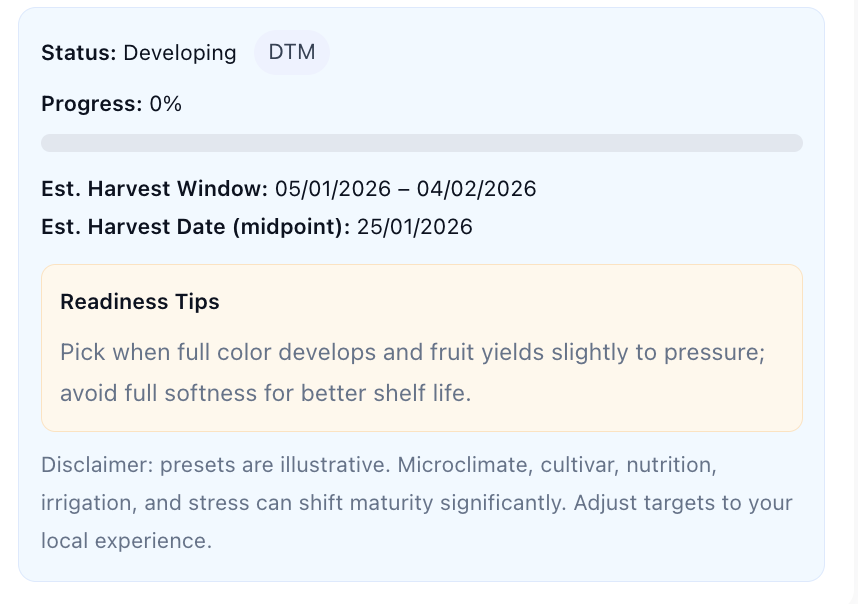
Your output will include:
- Status: Whether your crop is still developing, approaching maturity, or ready for harvest.
- Progress Bar: A visual indicator showing percentage progress.
- Harvest Window: The range of likely readiness dates.
- Midpoint Date: The best single-day estimate for ideal harvesting.
- Crop-Specific Tips: Guidance on visual and tactile cues to confirm readiness.
Together, these insights make it easy to plan irrigation, labor, and post-harvest handling.
Why Farmers and Gardeners Love It
The Harvest Readiness Estimator combines accuracy with simplicity. Its responsive design works on mobile and desktop, making it perfect for checking in the field. Whether you’re managing a commercial farm or a backyard garden, it helps you:
- Stay ahead of weather changes
- Optimise harvest timing for flavour and yield
- Plan storage or market delivery more efficiently
- Keep records for future growing seasons
It’s like having an agronomist’s insight at your fingertips — accessible anytime, anywhere.
Final Thoughts
The Harvest Readiness Estimator is more than just a calculator — it’s a smart planning companion for growers of all scales. By merging the simplicity of Days-to-Maturity with the precision of Growing Degree Days, it bridges traditional farming knowledge with modern technology.
Use it regularly throughout your season to monitor progress, adjust care routines, and confidently determine when your crops are ready to harvest. In agriculture, timing means everything — and this tool ensures your timing is always just right.
Frequently Asked Questions
Q: What is a Harvest Readiness Estimator?
A: The Harvest Readiness Estimator is a digital calculator that helps you estimate when your crop is likely to be ready for harvest. It uses two methods:
Days-to-Maturity (DTM)—based on the number of days from planting/transplanting to maturity. Growing Degree Days (GDD)—which sums heat accumulation (based on your daily minimum/maximum temperatures) to give a more climate-sensitive estimate. This gives you a harvest window (earliest to latest likely date) and a midpoint date.
Q: Which method should I pick—DTM or GDD?
A: Use DTM if you have a cultivar’s stated days-to-maturity (e.g., “80 days”) and your climate is relatively stable. It’s quick and simple.
Use GDD if you want more accuracy across variable climates or if your weather has been unusually cool or hot. GDD adjusts for actual heat accumulation and can better reflect accelerated or slowed growth. (“Growing Degree Days (GDD) is a key measurement for agricultural planning… Every time-sensitive crop intervention … has to be done at a specific plant growth stage.”)
Q: What do “base temperature” and “upper cap temperature” mean?
A: The base temperature (T₍base₎) is the minimum threshold above which your crop begins meaningful growth. Below that, little or no growth occurs. The cap temperature (T₍cap₎) is the upper threshold above which growth rate stops increasing (or may slow). These two parameters are critical when you accumulate GDD. For example, certain crops will use a T₍base₎ of 10 °C and a T₍cap₎ of 30 °C.
Q: How accurate is the estimate?
A: The estimate gives a window rather than a single guaranteed date. Many factors beyond temperature and calendar days affect maturity—such as soil fertility, irrigation, pest pressure, shade, cultivar variation, or stress. It’s best used as a planning guide in combination with field maturity cues (fruit colour, firmness, moisture content). For example, a grain study found that using heat accumulation (akin to GDD) improved accuracy of optimal harvest date estimation.
Q: Why should I input my own daily temperature min/max data?
A: Providing real min/max temperatures means the tool can compute actual GDD accumulation for your field and give a more tailored estimate. Without that data, the tool uses an average daily GDD assumption, which will still work but may be less precise.
Q: What if I don’t know the cultivar’s DTM or GDD target?
A: The tool includes crop presets with illustrative default values (for example, tomato: 70–85 DTM days; GDD target ~1000). Use those to begin, then adjust if your cultivar differs. Over time you can track your own data and refine your target values for your region.
Q: Can I switch between °C and °F units?
A: Yes—you can toggle units at the top of the tool. If you switch to °F, the base and cap temperature fields and any input min/max daily temps will interpret values in Fahrenheit. The output remains consistent.
Q: What should I do when the progress bar shows 100%?
A: Once progress reaches 100%, it suggests the crop has either reached (or is very close to) its maturity target (days or heat units). However, you should then check field maturity indicators (as mentioned above) to confirm readiness and decide the actual harvest timing.
Q: Can I manage multiple plantings or crops?
A: This version is designed for one crop estimate at a time. If you have multiple plantings, you can run the tool for each and save the summary (copy to clipboard or download). For more advanced tracking (multi-plot, calendar reminders) you might consider dedicated farm-management software.
Q: Is this tool a guarantee of harvest time?
A: No—it is an estimation tool. It helps plan, not guarantee. Actual harvest timing depends on many variables beyond what the calculator tracks (weather extremes, pest/disease, nutrient stress, soil moisture, cultivar differences). Use it alongside your field observations.